Rabbit — Jul 01 Task
- Related design: current-plan.md
- Status: task (feature description + carried-over design)
Full content of current-plan.md, included for reference.
- Source task file: jun-30-rabbit.md · IA: ../features/README.md
- Status: design (for review)
New First
✅ DONE — C4 관찰자 대시보드 + C2 서처(번들 제출)를 /xyz에 구현. 설계·구현: ../features/xyz-demo.md · ../features/c2-searcher.md
Feature description — PBS consumer track (relay/builder 소비자)
좋은 방향 전환이야 — relay·builder를 직접 만드는 대신 *이미 돌아가는 relay/builder 인프라를 소비하는 쪽. 이게 사실 현실 개발자가 PBS와 만나는 진짜 접점이야. 어디서 실제로 테스트 가능한지(테스트넷 relay 가용성) 먼저 확인하고 정리할게.
좋아, "이미 있는 relay를 쓴다" = **네가 인프라를 만드는 게 아니라 소비자가 되는 것**이야. 그럼 relay/builder를 만들 필요도, validator를 빌릴 필요도 없어 — 이미 돌아가는 Flashbots 인프라에 너의 트랜잭션/번들을 밀어넣거나, 그 데이터를 읽는 쪽이지. 네가 맡을 수 있는 역할이 4가지야:
네가 될 수 있는 4가지 소비자 역할
| 트랙 | 역할 | 뭘 만드나 | 필요한 것 | 어디서 테스트 |
|---|---|---|---|---|
| C4 ⭐첫걸음 | 관찰자 | relay Data API 읽어 분석/대시보드 | 아무것도(키 불필요) | 즉시(메인넷/Sepolia) |
| C2 ⭐핵심 | 서처(searcher) | 번들 만들어 eth_sendBundle로 제출 |
지갑·RPC | Sepolia |
| C1 | 일반 발신자 | Protect RPC로 프라이빗 tx | 지갑 | Sepolia |
| C3 | 검증자(제안자) | mev-boost를 실제 relay에 연결·관찰 | validator 운영 | 테스트넷 validator |
"relay를 사용"의 알맹이는 C2(서처) 야 — 네 번들을 진짜 relay/builder에 넣어서 실제 블록에 포함시키는 것. C4로 감을 잡고 → C2로 직접 써보는 순서를 추천해.
테스트넷 상황 (중요)
- Flashbots Protect/번들은 메인넷 + Sepolia + Holesky 지원인데, Holesky는 폐기(2025-09) 됐어. 그래서 실질적으로 Sepolia가 유일한 테스트 경로야. (Sepolia도 2026년 중 단계적 종료 예정이니, 시작 전에 [Flashbots 문서의 지원 네트워크]를 한 번 확인해.)
- Hoodi는 (검색 기준) 아직 Flashbots relay 지원이 확인 안 돼 — validator 실험(C3)용이지 번들(C2)용은 아님.
C4 — 관찰자 (지금 당장, 키도 필요 없음)
공개 relay Data API를 때려서 "누가 블록을 만들었나, 입찰가는 얼마였나"를 읽어:
# 최근 제안된 블록들(어느 builder/relay가 이겼는지, value 포함)
curl "https://boost-relay.flashbots.net/relay/v1/data/bidtraces/proposer_payload_delivered?limit=20"
# 특정 슬롯에 들어온 모든 입찰(경매 경쟁 관찰)
curl "https://boost-relay.flashbots.net/relay/v1/data/bidtraces/builder_blocks_received?slot=SLOT"
샘플 프로그램: 여러 relay(flashbots, bloxroute, agnostic…)를 동시에 폴링해서 builder 시장점유율·입찰가 분포·relay별 지연을 집계하는 작은 대시보드. relayscan(flashbots/relayscan)이 정확히 이걸 하는 오픈소스라 참고용으로 좋아. PBS "경매"가 실제로 어떻게 도는지 데이터로 체감돼.
C2 — 서처: 번들을 기존 relay에 제출 (핵심)
Sepolia에서 flashbots/ethers-provider-flashbots-bundle로 번들 한 개 보내보기:
import { FlashbotsBundleProvider } from "@flashbots/ethers-provider-bundle";
import { ethers } from "ethers";

const provider = new ethers.JsonRpcProvider(SEPOLIA_RPC);
const auth = ethers.Wallet.createRandom();          // 서명자(평판용 키)
const fb = await FlashbotsBundleProvider.create(
  provider, auth, "https://relay-sepolia.flashbots.net", "sepolia");

const wallet = new ethers.Wallet(PRIVKEY, provider);
const target = await provider.getBlockNumber() + 1;

// 번들 = 순서 정해진 tx 묶음 (원자적: 다 들어가거나 다 빠지거나)
const bundle = [{ signer: wallet, transaction: {
  chainId: 11155111, to: "0x...", value: 0n, gasLimit: 21000,
  maxFeePerGas: ethers.parseUnits("30","gwei"),
  maxPriorityFeePerGas: ethers.parseUnits("2","gwei"),
}}];

const signed = await fb.signBundle(bundle);
const sim = await fb.simulate(signed, target);      // ← 먼저 시뮬(중요)
console.log("sim:", sim);
const res = await fb.sendRawBundle(signed, target); // ← 기존 relay에 제출
console.log("bundleHash:", res.bundleHash);
// res.wait() 로 포함 여부 확인
샘플 프로그램 아이디어(진짜 "PBS를 쓴다"에 가까운 것):
- 원자적 멀티-tx: "approve → swap"을 한 번에(둘 다 되거나 둘 다 안 되거나) — 번들의 원자성 체감.
- backrun 봇: 특정 pending tx 뒤에 내 tx를 붙이는 번들(
mev_sendBundle+ MEV-Share 힌트) — 서처의 본질. - 프론트런 방지 실증: 같은 스왑을 (a) 공개 mempool, (b) Protect RPC로 각각 보내 결과(샌드위치 유무) 비교 — 우리가 며칠 얘기한 그 지점.
C1 — 일반 발신자 (제일 간단)
번들도 필요 없이, RPC만 바꿔 프라이빗 발송:
// RPC를 Protect로 바꾸면 그 지갑의 tx가 기존 builder로 프라이빗 전달
const provider = new ethers.JsonRpcProvider("https://rpc-sepolia.flashbots.net");
// 이후 일반 sendTransaction — mempool 안 거침
C3 — 검증자 쪽에서 기존 relay 쓰기 (무겁지만 "제안자 체험")
Hoodi(개방형 validator)에 검증자 하나 세우고 mev-boost를 여러 실제 relay에 연결:
mev-boost -mainnet=false \
  -relay https://0x...@boost-relay.flashbots.net \
  -relay https://0x...@bloxroute.relay... \
  -addr :18550
# CL 검증자 클라이언트의 --builder=http://localhost:18550
→ 네 블록이 실제 builder들의 경매로 채워지는 걸 mev-boost 로그로 관찰. "relay를 소비하는 제안자" 경험.
추천 경로
C4(데이터로 이해) → C2(번들로 직접 사용, Sepolia) → 필요하면 C3. C1은 C2 하다 보면 자연히 익혀져.
원하면 C4+C2 스타터 레포를 스캐폴딩해줄게 — pbs-consumer/에 (1) relaywatch/ 여러 relay Data API 폴링→builder 점유율 집계(Node/TS), (2) bundler/ Sepolia 번들 제출 3시나리오(원자 멀티-tx·backrun·공개vs프라이빗 비교), (3) .env.example·README(Sepolia 세팅·faucet 링크). 만들어줄까? 이건 도커도 validator도 필요 없어서 바로 npm run으로 굴러가.
Sources: Flashbots Protect Quick Start · Sending Tx & Bundles · Relay API 스펙 · ethers-provider-flashbots-bundle · Hoodi/Holesky 상태
관련 논의 (Related discussion)
- Laura Shin / Unchained — 스테이블코인 동결 & freeze 프론트런 — freeze 트랜잭션이 공개 mempool에서 프론트런당하는 실제 사례. 프라이빗 릴레이(Flashbots Protect/빌더 직결)로 pending 노출을 없애 순서 경주를 막는 게 해법 — 이 문서 C1/C2 트랙과 직접 연결됨.
New Second
Task description
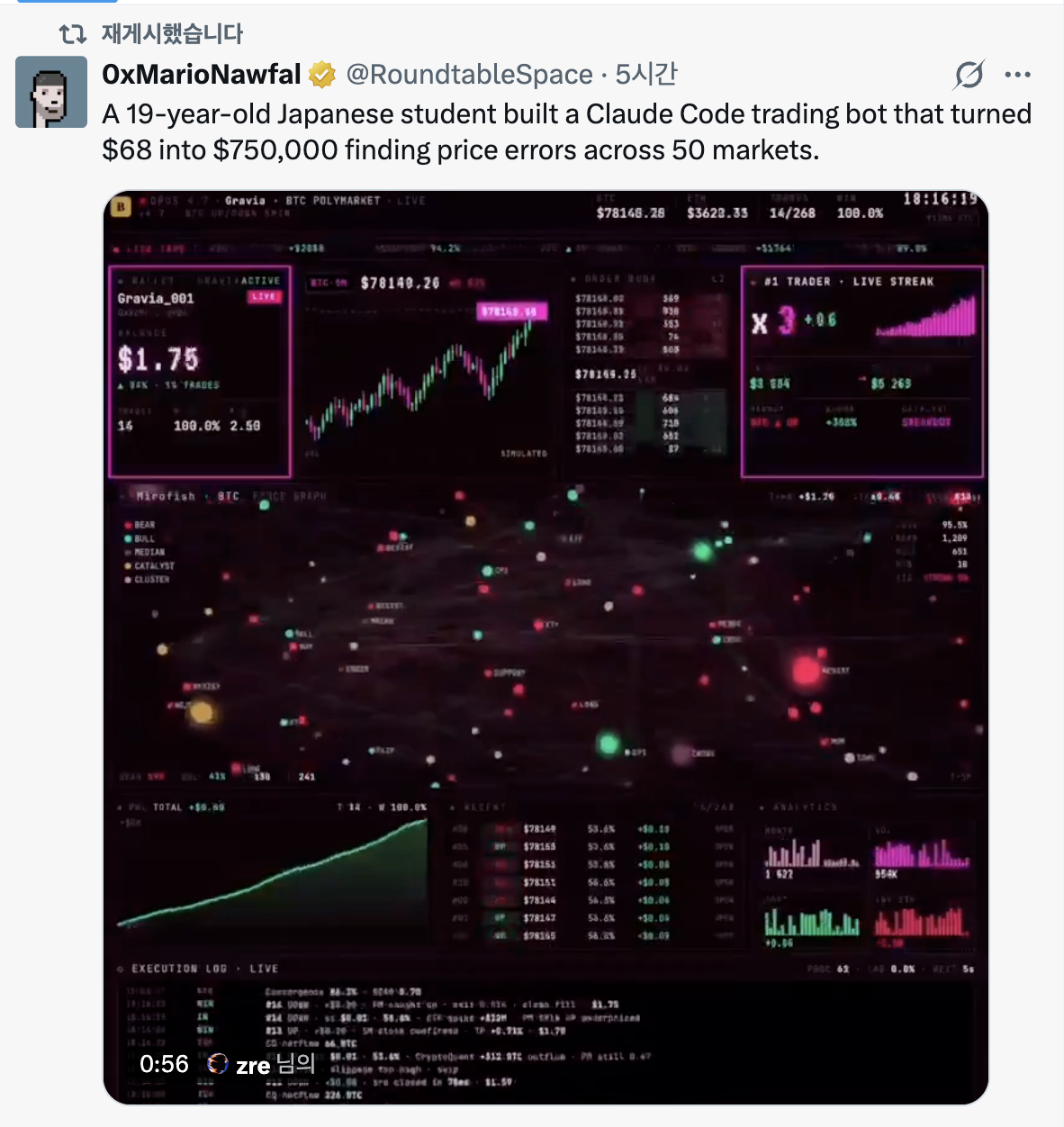 I want to have this kind of 쩌는 app in ETC category. Just similar web app that don't need to particular features.
Claude design
What jay wants (my read): a visually striking, "쩌는" live-trading dashboard like the Gravia
screenshot — a showcase piece under JayVerse (the renamed ETC menu). Not a real trading bot: no profit logic, no live
capital. We reproduce the look and motion with mock (optionally real-public) data. The screenshot
itself is labeled SIMULATED, so we stay honest and do the same.
Reality check on the source: the tweet's "$68 → $750,000 across 50 markets" is unverified
marketing. We copy the aesthetic + UX, not the claim. Label the page SIMULATED / DEMO clearly.
Concept
A single, self-contained page at /etc/gravia (working name) — pure client-side, dark cyberpunk
terminal aesthetic: neon magenta/green on near-black, monospace, a tight grid of glowing panels,
subtle scanline/CRT glow, everything animating in real time off one mock feed.
Panels (mirror the screenshot)
- Top ticker bar — model tag, market name, BTC/ETH prices, trade count, uptime clock.
- Wallet panel — balance, win-rate, trade count (animated counters).
- Live candlestick chart — BTC 5m, streaming candles.
- Order book ladder — bids/asks with size bars.
- #1 Trader · Live Streak — multiplier + sparkline.
- Market force-graph — the signature centerpiece: bear/bull/median/catalyst/cluster nodes on a physics-driven network, pulsing. (Hardest panel.)
- P&L cumulative curve — the "up and to the right" line.
- Recent trades table — streaming rows.
- Analytics bars — volume/heat mini bar charts.
- Execution log — bottom terminal log, new lines appended live.
Tech (all client-side, no backend → matches "no particular features")
- Charts:
lightweight-charts(TradingView) for candles + P&L line — tiny, canvas, fast. - Force graph:
react-force-graph-2dor rawd3-forceon a canvas. - Data: one mock feed — a seeded pseudo-random walk on
requestAnimationFrame/setIntervaldriving every panel. Deterministic seed → looks alive but reproducible (and SSR-safe). - Styling: Tailwind (already in the app) + a monospace font + CSS glow/scanline. No new heavy deps beyond the two chart libs.
- State: a single
useGravia()hook holds the simulated world; panels subscribe.
Optional "make it real" tie-ins (later, not MVP)
This same doc already carries real public feeds — we can swap mock → real for two panels:
- Hyperliquid orderbook (§3) → drive the real L2 book panel.
- Flashbots relay Data API (New First / PBS section) → a "builder auction" panel showing real winning bids. That turns the JayVerse page into a genuine PBS/MEV live board, not just eye-candy — a strong differentiator and a real tie to the rest of Rabbit.
Scope / recommendation
- MVP (build first): all panels, 100% mock animated feed, one route, no auth, no persistence. Fast, high "wow", zero infra — exactly the "don't need particular features" ask.
- v2: wire the Hyperliquid book + relay Data API into two panels for authenticity.
- Keep it clearly labeled SIMULATED with a one-line "what this is / isn't" note, so nobody mistakes it for a real trading product.
Open questions for jay
- Route name —
/etc/gravia, or a neutral one like/etc/trading-terminal? - MVP fully mock, or wire the real Hyperliquid book from day one?
- Is the force-graph centerpiece a must-have for MVP (it's the most work), or defer to v2?
New Third
✅ DONE
- Compile docs/features/etc.md into docs/features/xyz-demo.md
- Change the name ETC to JayVerse that contains the eye-popping features describe in New Second
Done (2026-07-01):
etc.md's misc experiments (SimpleX Chat test) folded into ../features/xyz-demo.md under a new "Misc experiments (absorbed from ETC)" section.- ETC → JayVerse:
docs/features/etc.mdrenamed (git mv) to ../features/jayverse.md and rewritten as the JayVerse showcase category (/jayverse), holding the eye-popping Gravia live-trading dashboard from New Second. - IA table in ../features/README.md updated:
ETC | /etc | etc.md→JayVerse | /jayverse | jayverse.md.
New Fourth
✅ DONE
- Please Add the button to change English mode and Korean mode besides "Dard/Light" mode button
- This can be another commit.
Done (2026-07-01): Added an EN/KO language toggle button next to the theme toggle in
app/Nav.tsx. New app/LangContext.tsx (client, localStorage-persisted), app/LangToggle.tsx
(the button), app/NavLinks.tsx (menu labels switch ko/en); app/layout.tsx wraps the app in
LangProvider and sets <html lang> before paint (no flash). First cut translates the top-menu
labels; page content can follow incrementally. Committed separately.
0. Summary
Designs for the Jun 30 tasks: split Portfolio & Market into two categories + reorder the menu,
refine auth / LLM gating, build the Market page (Hyperliquid orderbook + indices), fix the
Knowledge page (serve know.html), add KB-over-MCP/RAG to AI Chat, an AP2 Stripe
settlement example, and an ETC ERC-7702 / 7715 demo.
1. Split "Portfolio & Market" → Portfolio + Market
✅ DONE
Now: one item Portfolio & Market (/portfolio, stub). Target: two categories.
- Portfolio →
/portfolio— holdings, P&L (login-only). - Market →
/market(new) — market data (indices + Hyperliquid orderbook, §3).
New menu order: Knowledge · Portfolio · AI Chat · Game · Market · AP2 · XYZ · JayVerse.
Decided (jay): Home = / (logo/profile entry, leads the bar) and Verex = trailing
external link after JayVerse. Full bar:
Home · Knowledge · Portfolio · AI Chat · Game · Market · AP2 · XYZ · JayVerse · Verex ↗.
Work: edit app/Nav.tsx MENU; create /market; move market widgets out of /summary; keep
/portfolio for holdings.
✅ Done (2026-06-30): Nav.tsx split + reordered; /market page added (stub — indices/orderbook
content is §3 / task 3); /market public + /portfolio still login-only in middleware.ts.
Verified on build + server (/market 200, /portfolio 302→/login).
(2026-06-30 update: Knowledge category later removed from the menu — see §4; current bar omits 지식.)
2. Auth + LLM gating
🔲 TODO
- Login-only category: Portfolio — its menu item is hidden until login (
authOnlyinNav.tsx) and access-gated inmiddleware.ts. (AI Chat: menu stays visible, access-gated.) - AI Chat access model:
- To chat, the user selects a Proprietary LLM and supplies their own API key.
- Local LLM works only when the app runs on the local machine (local mode — Ollama
reachable at
localhost). On the cloud deployment it's shown but disabled (no hosted OSS model provisioned yet) → selecting it there shows "not available in cloud yet". - jay (
linked0@gmail.com) uses the server-stored API key for the proprietary LLM (no paste).
- Design:
lib/ai.tsalready abstracts providers. Add a key/source resolver:jay → env secret·other user → own key, persisted per user, **encrypted at rest**·Local LLM → enabled in local mode (Ollama at localhost), disabled in cloud. Gate the stored-key path onsession.user.email === linked0@gmail.com; detect mode viaappMode()(lib/mode.ts) so the Local LLM option is live locally and inert in cloud. - Decided (jay): persist users' keys — encrypted at rest (encryption key in env, never
plaintext; a
userApiKeyfield keyed by user). Proprietary provider = current setting (OpenAI); add Anthropic later if wanted.
3. Market page — Hyperliquid orderbook + indices
🔲 TODO
- New
/marketshows:- Important indices — reuse
/summary'sIndexCards(BTC · ETH · S&P 500 · KOSPI). - Hyperliquid orderbook — live L2 (bids/asks, maybe funding) for a chosen market. Reuse
app/api/perp/app/api/indicesif they fit, else addapp/api/orderbookproxying Hyperliquid's public info endpoint.
- Important indices — reuse
- Design: server route proxies the Hyperliquid REST snapshot (or a WS client streams to the page); render a compact L2 book above the index cards. Public API → no key.
- Decided (jay): REST poll first, add WebSocket in a later step. Default market = BTC perp (most liquid) for the first cut.
4. Knowledge page — serve know.html (Fix: No content)
✅ DONE
↺ Superseded (2026-06-30) — Knowledge category removed (restore when needed). Per jay: the
Knowledge menu item + /knowledge route were removed from the app; its content now lives in
docs/ for local file:// browsing (not web-served → no public exposure):
docs/know.html (index, opened via file:///Users/jay/work/task/docs/know.html) + docs/knowledge/
(e.g. management.md). The web-iframe approach below is on hold. Open: know.html links to
ai//eng//nostra/ (in archive/, 881 MB) + docs/* — not relocated; left for the restore step.
- Now:
/knowledgeis a stub;know.htmlsits loose at the repo root (plus a copy inpublic/). - Target:
/knowledgerendersknow.html; move the loose root content files into a proper home. - Decided (jay): serve
know.htmlas the main content (iframe, no React port); gather the files it references and move the whole set intopublic/knowledge/. - Design: move
know.html+ its linked files (e.g.management.md, any images it points to) intopublic/knowledge/;/knowledgeembedspublic/knowledge/know.htmlin an iframe. (Scanknow.htmlforhref/srcto find the exact related-file set.) - ✅ Done (2026-06-30): moved
know.html+management.md→public/knowledge/;/knowledgeiframes/knowledge/know.html;middleware.tsmatcher excludesknowledge/so the static file serves without auth. Verified (200 + "Workspace Index" content). - Loose root files →
docs/archive/✅ (2026-06-30): moved the leftover study files (index.html,baseline_*.html,management.html,sarah_chen_index.html,luminary_index.html,zksnark_math.html,assumptions.md,clarifying_questions.md) intodocs/archive/for later reference.README.md(project setup) stays at root. - know.html links — recommend PRUNE (not fix). The app web-serves only
public/, so its links toai//eng//nostra//images//docs/(repo files now inarchive//docs/) would still 404 even if the paths were corrected. Plan: fix the one served link (management.md→/knowledge/management.md) and neutralize the rest (strip dead localhrefs, keep the text). Pending jay's go-ahead.
5. AI Chat — KB via MCP + RAG
🔲 TODO
- Goal: chat can query the Knowledge KB using RAG, exposed through an MCP tool.
- Decided (jay): the MCP exposes KB search / retrieval (settles the earlier TBD; see
../features/ai-chat.md). - Design:
- Index Knowledge content (
know.html+ md) → embeddings → vector store (local Chroma/Qdrant, or a simple file index to start). - Expose retrieval as this project's MCP server; the chat agent calls it as a tool. (Fallback:
do RAG directly in
/api/chatand keep MCP for tool-calling.) - Flow: question → retrieve top-k chunks → inject into prompt → LLM answers with citations.
- Index Knowledge content (
- Open: embedding model (local
nomic-embedvs OpenAI), vector store, MCP-tool vs in-route RAG.
6. AP2 — Stripe settlement example (educational)
🔲 TODO
- Goal: a simple, educational fiat settlement example via Stripe (counterpart to the
on-chain x402 / aiaas track in
../features/ap2-test.md). - Design: mock "agent buys data, settles via Stripe": provider returns a price → client creates a Stripe Checkout / PaymentIntent → on success the data is released. Test-mode keys only, no real charges.
- Open: Checkout vs PaymentIntent; how prominently to contrast it with x402.
7. ETC — ERC-7702 / 7715 demo (educational)
🔲 TODO
Standards (jay confirmed): EIP-7702 (an EOA temporarily runs smart-account code = a
delegatable smart account) + ERC-7715 (wallet_grantPermissions — grant a scoped session
key) / ERC-7710 (delegation).
- Goal: a test page for delegatable smart accounts / session keys — ties directly to the aiaas spend-policy idea (session key = agent's bounded wallet).
- Design (educational):
- Connect a wallet → grant a session key with a scoped permission ("spend ≤ X testnet USDC to address Y, valid 1h") per ERC-7715 → show the session key performing that bounded action without re-signing.
- Testnet (Sepolia) + a 7702-capable account; display the permission grant + one delegated tx.
- Decided (jay): stack = MetaMask Delegation Toolkit (implements 7715/7710) on Sepolia. (Alternative: ZeroDev / permissionless.js for 7702/4337 session keys.) Scope = short explainer + one demo tx.
8. Cross-cutting — IA update
🔲 TODO
- Update the Target IA table in
../features/README.md: split Portfolio & Market, add Market, apply the new order. - New/changed routes:
/market; Knowledge content move + serve;/etcERC demo subpage; AP2 Stripe example under/ap2.
9. Decisions & remaining open questions
Resolved (jay):
- Home =
/(logo) · Verex = trailing external link. - AI Chat keys: persist per user, encrypted at rest; proprietary provider = OpenAI now (Anthropic later — easy add).
- Market: REST poll first, WebSocket next; default market BTC perp.
- Knowledge: serve
know.htmlas-is (iframe) + move it and its linked files intopublic/knowledge/. - MCP exposes KB retrieval.
- ETC standards = 7702 + 7715/7710; stack = MetaMask Delegation Toolkit on Sepolia.
Still open:
- KB: embedding model (local
nomic-embedvs OpenAI) + vector store; MCP-tool vs in-route RAG. - AP2: Stripe Checkout vs PaymentIntent.
10. Suggested sequence
- Menu split + reorder + Market page (indices first, orderbook next).
- Knowledge content move + serve
know.html. - AI Chat gating (BYO key / jay's stored key; local disabled).
- KB RAG + MCP.
- AP2 Stripe example; ETC ERC-7702/7715 demo.