Jun-19 Rabbit — Design & Task Breakdown
Design doc derived from
jun-19-rabbit.md. Captures the decisions made and a "who does what" plan. (2026-06-25, refined — jay's answers folded into Decisions)
Task map
| # | Area | Status |
|---|---|---|
| 1 | Portfolio & Market — Input + Current Status (Postgres) | ready to build |
| 2 | Portfolio & Market — Simulate results | Claude builds v1, jay refines UI later |
| 3 | Portfolio & Market — Hyperliquid ETH-perp trading (API) | display first, trading next (testnet) |
| 4 | AI Chat — MCP support (spaghetti recipe MCP + on/off toggle) | ready to build |
| 5 | New Site — home/ folder inside the rabbit project = www.jaylabs.xyz |
ready to build |
| 6 | Deploy into GCP — *.run.app first, custom domain later |
ready to build |
Decisions (locked — incl. jay's 2026-06-25 answers)
| Topic | Decision |
|---|---|
| Database | Cloud SQL for PostgreSQL — project doubletree-498007 (billing confirmed enabled), region asia-northeast3, smallest tier (OK'd) |
| ORM | Prisma |
| Base currency | KRW (cash row + market values in KRW) |
| Price feed | Upbit public API (KRW-native, no key) for crypto; CoinGecko as broader fallback; Alpha Vantage for stocks later — see Task 1 |
| Trades schema | Keep lean for v1 — no orderId/realizedPnl yet; defaults assetType=CRYPTO, currency=KRW (jay: "as you think is better") |
| Hyperliquid | Testnet first. Phase 1 = display only (no key), Phase 2 = trading. Order types: market + limit. ETH-PERP first, leave room for other perps. jay creates the agent wallet |
| AI Chat model | claude-sonnet-4-6 now; document how to self-host a local LLM on GCP for later swap |
| MCP server | Dir kept as spagetties; hardcoded sample recipes (simplest); chat history in-memory per session |
| New Site | home/ folder inside the rabbit project (no new repo); one-time copy of linked0.github.io; serve on apex jaylabs.xyz + www |
| Public domain | Phase 1 (now): use the Cloud Run *.run.app URL directly — rabbit = https://rabbit-179807446244.asia-northeast3.run.app/, verex = its own *.run.app. Phase 2 (later): map www.jaylabs.xyz + apex → rabbit, verex.jaylabs.xyz → verex. rabbit.jaylabs.xyz dropped |
| Auth | existing Google login (Auth.js) + ALLOWED_EMAILS gate (single user) |
| Secrets | pushed to Secret Manager via scripts/deploy.sh (existing pattern) |
| Git plan | One branch (claude/jun-19-rabbit), several commits (one per task) — per jay |
💸 Cost note: Cloud SQL bills monthly even when idle (~$8–10+ at smallest tier). Start small, resize later.
Task 1 — Investment input + Current Status (Postgres)
Per the spec, this is two halves: (a) an input page to log investment actions, and (b) a Current Status view derived from those records. General investment tracking — not crypto-only (stocks, ETFs, crypto, etc.).
Current → Proposed
- Current: no database, no input page.
- Proposed:
- Input: form → API route → Prisma → Cloud SQL Postgres. Scoped per user (
userEmail). - Current Status: computed from the trade rows — net quantity & average cost per symbol,
current value + unrealized P&L. (No separate table needed at first; compute on read.
Add a
Holdingsnapshot later only if performance needs it.)
- Input: form → API route → Prisma → Cloud SQL Postgres. Scoped per user (
UI (from jay's wireframe — docs/images/ui/investment-basic-ui.png)
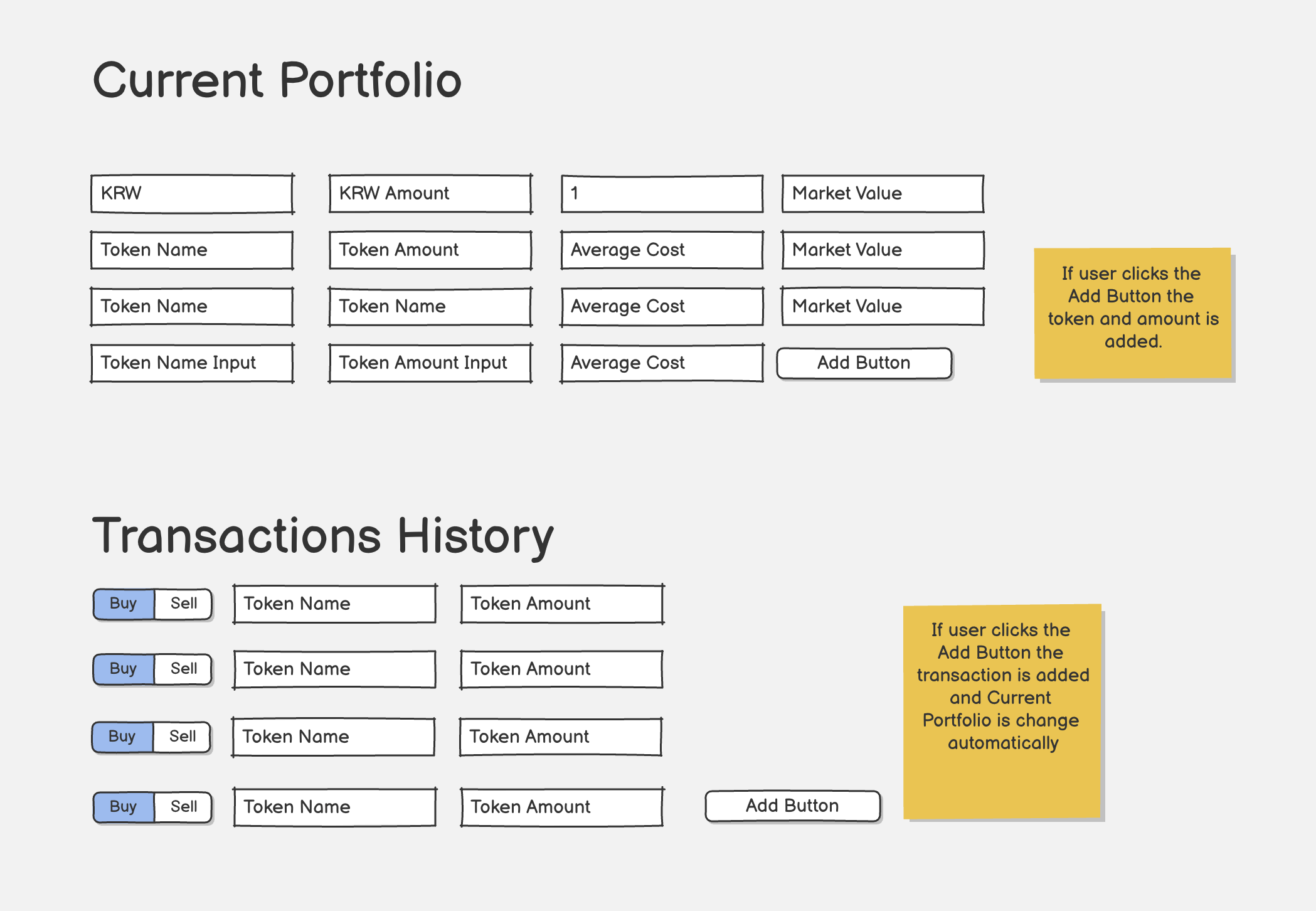
The input page is two stacked sections:
Current Portfolio — a holdings grid, one row per asset:
| Token | Amount | Average Cost | Market Value |
|---|---|---|---|
| KRW (cash) | KRW amount | 1 | market value |
| token… | amount | avg cost | market value |
| Token Name input | Token Amount input | Average Cost | [Add] |
- Top row is KRW cash; bottom row is an inline add form → clicking [Add] inserts the token + amount.
- Average Cost and Market Value are derived (avg cost from transactions; market value = amount × current price from the price feed).
Transactions History — one row per trade:
[Buy | Sell]toggle ·Token Name·Token Amount, with an [Add] button at the bottom.- Adding a transaction auto-updates Current Portfolio (recompute amount & average cost). This matches the compute-on-read model above.
Implications:
- Base currency = KRW (locked).
- Two write paths: (a) seed a holding directly via the Portfolio add-row, (b) add a Buy/Sell transaction that recomputes holdings. The Buy/Sell toggle maps to
TradeSide. A direct seed is modeled as an openingBUYso transactions stay the single source of truth.
Price feed (jay: "recommend me, and where to get the key")
Recommendation, since base currency = KRW and v1 is crypto-first:
- Primary — Upbit public API (
https://api.upbit.com/v1/ticker?markets=KRW-BTC,KRW-ETH…). No API key, KRW-native (returns KRW prices directly), generous rate limits. Best fit for KRW. - Fallback / broader coverage — CoinGecko (supports
vs_currency=krw). Free Demo key from coingecko.com → Developer Dashboard → "Create Demo API key." Use when a token isn't on Upbit. - Stocks (later) — Alpha Vantage: free instant key at
alphavantage.co/support/#api-key (reuse existing
MARKET_API_KEYif set).
Plan: start with Upbit (no key) so Task 1 has zero key setup; add CoinGecko/Alpha Vantage keys to Secret Manager only when needed.
Schema (Prisma) — locked for v1
// prisma/schema.prisma
generator client { provider = "prisma-client-js" }
datasource db { provider = "postgresql"; url = env("DATABASE_URL") }

enum TradeSide { BUY  SELL }

model Trade {
  id         String    @id @default(cuid())
  userEmail  String                            // matches ALLOWED_EMAILS
  assetType  String    @default("CRYPTO")       // CRYPTO | STOCK | ETF | CASH …
  market     String?                            // "Upbit", "Bithumb", "KRX", "NASDAQ" …
  symbol     String                             // "BTC", "ETH", "AAPL", …
  side       TradeSide
  quantity   Decimal   @db.Decimal(38, 18)
  price      Decimal   @db.Decimal(38, 18)       // per unit, in `currency`
  currency   String    @default("KRW")           // base = KRW
  fee        Decimal?  @db.Decimal(38, 18)
  tradedAt   DateTime                             // when the action happened
  note       String?
  createdAt  DateTime  @default(now())
  updatedAt  DateTime  @updatedAt

  @@index([userEmail, tradedAt])
  @@index([symbol])
}
Decision: no orderId/realizedPnl in v1 — realized P&L computed on read later if needed.
Deliverable: document the GCP DB setup
The spec asks to "provide how to set a Database instance in GCP." → produce a short doc/runbook
(Cloud SQL create → DB/user → connect Cloud Run → DATABASE_URL to Secret Manager).
To-do (who does what)
| You (jay) | Me (Claude) |
|---|---|
Create Cloud SQL instance + DB + user (gcloud) + write the setup runbook |
|
| — (schema locked) | Add Prisma + schema.prisma, run migration |
| — (price feed: Upbit, no key) | Build input page + API (add/list) + Current Portfolio + Transactions History |
Connect Cloud Run → Cloud SQL; add DATABASE_URL to Secret Manager |
Task 2 — Simulate results based on investment policy
- jay: "You can build as you wish and then I will refine." → Claude builds a v1, jay refines the UI.
- Likely shape: run the recorded trades/holdings through different investment policies (DCA, rebalance-to-target, take-profit / stop-loss, plain hold) and show projected P&L vs a baseline.
- Depends on Task 1 data (trades in Postgres).
- v1: a small policy panel — pick a policy + parameters, run it over the user's history, and chart the outcome vs "buy & hold." Start with 1–2 policies (DCA + buy&hold baseline), expand later.
Task 3 — Hyperliquid ETH-perp trading (API)
Spec: "Make a user trade Ethereum Perp UI through API." A trading panel inside Portfolio & Market, wired to the Hyperliquid perps API. Testnet first.
Phasing (jay: "first display and trading next")
- Phase 1 — Display only (NO key needed). jay's question answered: correct — read/display needs no API or agent wallet. Hyperliquid info endpoints are public. Phase 1 shows: ETH-PERP mark price, your open position, margin, unrealized P&L. Build this first.
- Phase 2 — Trading (signed). Place market + limit orders on ETH-PERP (long/short, size, optional reduce-only); cancel orders. This is the part that needs the agent wallet.
Coverage
- ETH-PERP first, but structure the code to leave room for other perps (symbol-parameterized).
Security (critical — real money, Phase 2 only)
- Signing key lives server-side only (API route), never in the browser. Stored in Secret Manager.
- Use a Hyperliquid API/agent wallet (scoped, revocable) — not the main wallet. jay will create it.
- Testnet first. Mainnet only after jay explicitly confirms, ideally with a notional cap.
Deliverable: how to create a Hyperliquid agent wallet (for Phase 2)
Short runbook: Hyperliquid → "API" / agent-wallet setup → generate an API wallet scoped to trading →
copy its private key → put in Secret Manager (HL_AGENT_KEY). (Needed only when Phase 2 starts.)
To-do (who does what)
| You (jay) | Me (Claude) |
|---|---|
| (Phase 2) Create the agent wallet; key → Secret Manager | Phase 1: build the read/display panel (no key) |
| (Phase 2) Approve mainnet + notional cap | Phase 2: signed market/limit order API route on testnet; on/off + confirm guards |
Optional later: mirror fills into the Trade table |
Task 4 — AI Chat with MCP support
Spec: the AI chat page connects to a simple MCP server in
rabbit/spagetties/that serves spaghetti recipes recommended by Claude, with an on/off switch in the UI.
Two pieces
- The MCP server (
rabbit/spagetties/) — minimal server exposing one tool,recommend_spaghetti_recipe(preferences?)→ returns a recipe from a hardcoded sample set (simplest, per jay). Built on@modelcontextprotocol/sdk(TypeScript). - The AI Chat page (in the
rabbitapp) — talks to Claude (claude-sonnet-4-6). Toggle on → spaghetti MCP attached as a tool source; toggle off → plain chat, no tools. Chat history is in-memory per session (no DB).
Current → Proposed
- Current: none.
- Proposed: Chat UI (messages + input) → server API route → Anthropic Messages API. A header
switch drives whether
mcp_servers/tools are included. Badge when active ("🍝 Spaghetti MCP: on").
Transport
- Run the spaghetti server as a small HTTP (SSE) MCP endpoint the API route connects to (deployable next to Cloud Run). stdio is fine for local dev only.
Model — now Sonnet, local LLM later
- Now:
claude-sonnet-4-6(cheap for a toy chat). - Deliverable (per jay): document how to self-host a local LLM on GCP — e.g. Ollama on a GPU VM (or Cloud Run with GPU) exposing an OpenAI-compatible endpoint, then point the chat's API route at that base URL via an env var so swapping Sonnet → local is a config change, not a rewrite.
To-do (who does what)
| You (jay) | Me (Claude) |
|---|---|
Provide ANTHROPIC_API_KEY → Secret Manager |
Scaffold rabbit/spagetties/ MCP server (one recipe tool, hardcoded recipes) |
| (Later) decide which local LLM | Build chat page + API route + on/off toggle; write the local-LLM-on-GCP runbook |
| Verify tool-call round-trip with toggle on, plain chat with it off |
Task 5 — New Site: home/ inside the rabbit project (www.jaylabs.xyz)
jay's correction: "rabbit is the project for
www.jaylabs.xyz. No new repo — just create ahomefolder in the rabbit project." So the home site is part of the rabbit project, not a separate repo/service.
Current → Proposed
- Proposed:
- New
rabbit/home/folder holding the landing page + the migratedlinked0.github.iopages. - Served by the rabbit Next.js app (public routes), with the portfolio/chat features behind login.
- Landing page links to
verex.jaylabs.xyz(and the app's own sections). - One-time copy of
linked0.github.io→ local pages/subpages underrabbit/home/(in-repo, not a live proxy). - Domain: serve on apex
jaylabs.xyz+www.jaylabs.xyz, mapped to the rabbit Cloud Run service.
- New
Domain (decided — phased)
- Phase 1 (now): access the site at the Cloud Run URL
https://rabbit-179807446244.asia-northeast3.run.app/— no DNS/custom-domain work yet. (verex stays on its own*.run.appURL.) - Phase 2 (later): map
www.jaylabs.xyz+ apexjaylabs.xyz→ the rabbit service, andverex.jaylabs.xyz→ the verex service.rabbit.jaylabs.xyzis dropped. - One Cloud Run service serves both the home site and the rabbit app features.
To-do (who does what)
| You (jay) | Me (Claude) |
|---|---|
Be ready to edit DNS for jaylabs.xyz (apex + www) |
Create rabbit/home/, build landing + verex link |
| Add the DNS records GCP provides (incl. apex A/AAAA) | One-time fetch & port linked0.github.io pages into rabbit/home/ |
| Add apex + www domain mappings to the rabbit service |
Task 6 — Deploy into GCP + domain
Phased. Detailed click-by-click Console steps are in GCP Console — step-by-step setup below.
Phase 1 (now) — ship to the *.run.app URL
- Current: deploys to the auto
…run.appURL (scripts/deploy.sh). - Use it directly:
https://rabbit-179807446244.asia-northeast3.run.app/. No DNS work. AUTH_URLand the Google OAuth redirect both point at the run.app host —deploy.shalready pins this (lines 65–71) to avoid the Auth.js PKCE cookie issue. So Phase 1 needs no auth change.
| You (jay) | Me (Claude) |
|---|---|
| Confirm the run.app URL is the one to use | Deploy via scripts/deploy.sh; verify /invest, /chat on the run.app URL |
Add ANTHROPIC_API_KEY, DATABASE_URL → Secret Manager |
Wire Cloud Run → Cloud SQL + secrets (Console steps below) |
Phase 2 (later) — custom domains
- Map
jaylabs.xyz+www.jaylabs.xyz→ rabbit service,verex.jaylabs.xyz→ verex service.rabbit.jaylabs.xyzis not used.
| You (jay) | Me (Claude) |
|---|---|
Be ready to edit DNS at the jaylabs.xyz registrar |
Run gcloud run domain-mappings create (apex + www) |
| Add the DNS records GCP provides; verify ownership if prompted | Give you the exact DNS records |
Update Google OAuth redirect URI → https://www.jaylabs.xyz/api/auth/callback/google |
Switch AUTH_URL=https://www.jaylabs.xyz in deploy |
Note: moving from the run.app host to the custom domain means updating both
AUTH_URLand the OAuth redirect URI to the same host, or Auth.js PKCE cookies break.
GCP Console — step-by-step setup (web UI)
Click-by-click setup through the GCP Console (web), project
doubletree-498007, regionasia-northeast3. CLI equivalents live inscripts/deploy.sh+ docs/runbooks/cloud-sql-setup.md.
1. Cloud SQL instance (Console → SQL)
- Console → SQL → Create Instance → PostgreSQL.
- Instance ID
rabbit-pg; password forpostgres; Regionasia-northeast3; Edition Enterprise, Sandbox / shared-core (db-f1-micro) preset (cheapest); Storage 10 GB, auto-increase on → Create. - Open the instance → Databases → Create database
rabbit. - Users → Add user account →
rabbit_app+ a strong password. - Overview → copy the Connection name (
doubletree-498007:asia-northeast3:rabbit-pg).
2. Secrets (Console → Security → Secret Manager)
For each of DATABASE_URL, ANTHROPIC_API_KEY, AUTH_SECRET, AUTH_GOOGLE_ID, AUTH_GOOGLE_SECRET:
- Create Secret → name it → paste the value → Create.
DATABASE_URL=postgresql://rabbit_app:<pw>@localhost/rabbit?host=/cloudsql/doubletree-498007:asia-northeast3:rabbit-pg
- After deploying the service (step 3), grant its service account the role Secret Manager Secret Accessor (Console usually offers this automatically when you reference a secret).
3. Deploy rabbit to Cloud Run (Console → Cloud Run)
- Console → Cloud Run → Create Service (or open
rabbit→ Edit & Deploy New Revision). - Container image: the image
scripts/deploy.shbuilds & pushes to Artifact Registry (select it). - Region
asia-northeast3; Service namerabbit; Authentication → Allow unauthenticated invocations (the app runs its own Google login). - Containers → Variables & Secrets:
- Env vars:
APP_MODE=cloud,ALLOWED_EMAILS=linked0@gmail.com,AI_PROVIDER=anthropic. - Secrets: "Reference a secret" →
DATABASE_URL,ANTHROPIC_API_KEY,AUTH_SECRET,AUTH_GOOGLE_ID,AUTH_GOOGLE_SECRET→ expose each as the matching env var.
- Env vars:
- Containers → Connections → Cloud SQL connections → Add connection → pick
rabbit-pg(mounts the socket at/cloudsql/…, matchingDATABASE_URL). - Deploy → the service page shows the URL →
https://rabbit-179807446244.asia-northeast3.run.app/(this is the Phase-1 site).
4. Google OAuth redirect (Console → APIs & Services → Credentials)
- Console → APIs & Services → Credentials → open your OAuth 2.0 Client ID.
- Authorized redirect URIs → Add URI:
- Phase 1:
https://rabbit-179807446244.asia-northeast3.run.app/api/auth/callback/google - Phase 2:
https://www.jaylabs.xyz/api/auth/callback/google
- Phase 1:
- Save.
5. (Phase 2) Map a custom domain (Console → Cloud Run → Domain mappings)
- Cloud Run → Manage Custom Domains → Add Mapping.
- Service
rabbit, domainwww.jaylabs.xyz(repeat for apexjaylabs.xyz); for verex use the verex service +verex.jaylabs.xyz. - Console returns DNS records (CNAME for
www, A/AAAA for apex) → add them at the jaylabs.xyz registrar → wait for verification + the managed TLS cert. - Then switch
AUTH_URL→https://www.jaylabs.xyz(new revision) and confirm the OAuth URI from step 4.
Local LLM on GCP — self-hosted (for the later Sonnet → local swap)
Task 4 deliverable. Goal: run an open model behind an OpenAI-compatible endpoint so the chat's API route swaps from
claude-sonnet-4-6to a local model via env vars only —lib/ai.tsalready has an Ollama path (OLLAMA_BASE_URL/OLLAMA_MODEL).
Option A — Ollama on a GPU VM (Compute Engine) — recommended
- Console → Compute Engine → VM instances → Create Instance.
- Machine g2-standard-4 + 1× NVIDIA L4 (or n1 + T4). Boot disk Ubuntu 22.04, 50 GB+.
- GPUs may need a quota bump: IAM & Admin → Quotas → request
GPUs (all regions) ≥ 1.
- SSH in (Console "SSH" button) → install Ollama:
Ollama serves an OpenAI-compatible API atcurl -fsSL https://ollama.com/install.sh | sh ollama pull llama3.1:8b # or qwen2.5:7b, gemma2, …:11434/v1automatically. - Lock it down — Ollama has no auth. Do NOT open
:11434to the internet. Either:- keep the VM private and reach it from Cloud Run over a Serverless VPC Connector, or
- front it with an authenticated reverse proxy (Caddy/nginx + bearer token in Secret Manager).
- Point the app at it (new Cloud Run revision):
OLLAMA_BASE_URL=http://<vm-internal-ip>:11434,OLLAMA_MODEL=llama3.1:8b(+APP_MODE/AI_PROVIDERperlib/ai.ts).
Option B — Cloud Run with GPU (serverless)
- Cloud Run supports NVIDIA L4 GPUs. Deploy an Ollama container with
--gpu 1 --gpu-type nvidia-l4, min-instances ≥ 1 (cold start re-pulls the model). Simpler ops; GPU billed while warm.
Cost / security
- A GPU VM bills per hour while running (L4 ≈ a few $/hr) → stop the VM when idle. Cloud Run GPU bills while an instance is warm.
- Never expose raw Ollama publicly (no auth by default) — VPC-internal + token proxy only.
- Any proxy token → Secret Manager, injected into Cloud Run like the other secrets.
Swap is config-only (no code change)
# now — Sonnet
AI_PROVIDER=anthropic
AI_API_KEY=<secret>
# later — local LLM in the cloud
APP_MODE=cloud
OLLAMA_BASE_URL=http://<internal-host>:11434
OLLAMA_MODEL=llama3.1:8b
Remaining for jay — ✅ none, all decided
Domain shape→www.jaylabs.xyz(+apex) for everything;rabbit.jaylabs.xyzdropped.Billing on→ confirmed enabled.doubletree-498007
Ready to build. Say "go" and I'll start on claude/jun-19-rabbit.
When ready — git plan (per jay: one branch, several commits)
Say "go". I'll work on one branch claude/jun-19-rabbit and make one commit per task
(each stops for your review before the commit):
feat(portfolio): trade input + Current Portfolio + Transactions (Postgres)— Task 1feat(portfolio): policy simulation v1— Task 2feat(perp): Hyperliquid ETH-PERP display (Phase 1)— Task 3 (trading = later commit)feat(chat): AI chat + spaghetti MCP toggle— Task 4feat(home): www.jaylabs.xyz landing + linked0 migration— Task 5chore(deploy): domain mappings + AUTH_URL— Task 6